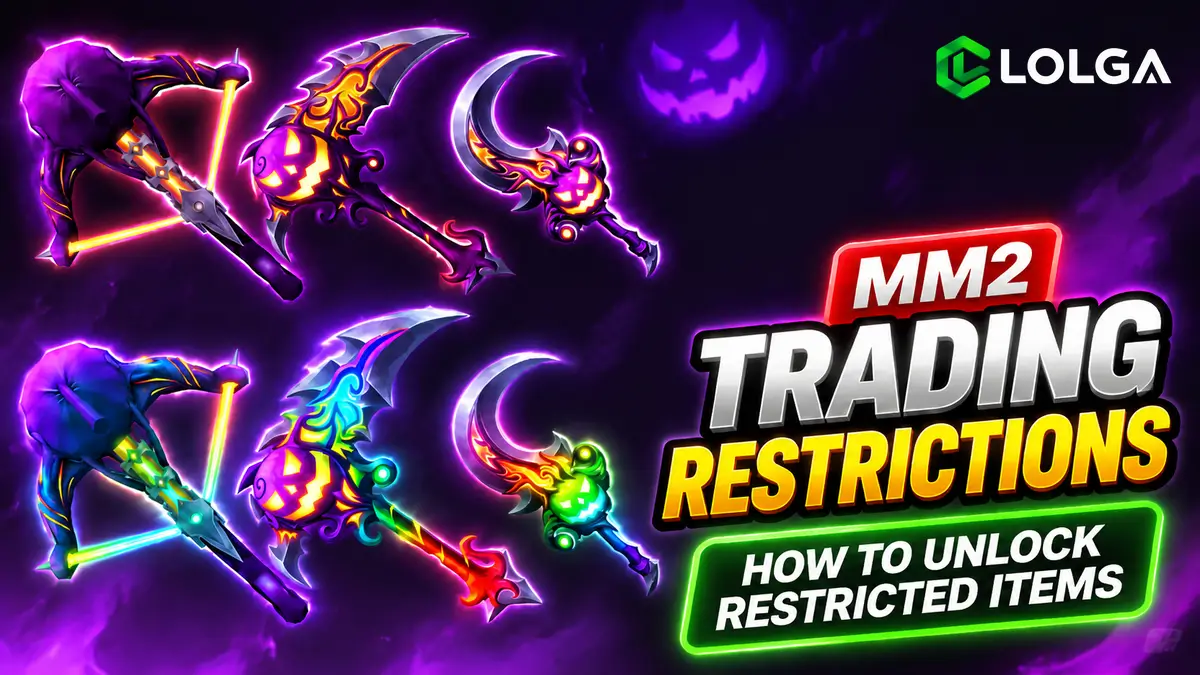
If you receive weapons such as Emberbow Gun, Emberscythe, or Embersickle in MM2 but cannot trade them again, your Roblox account may not have completed the required identity verification. This guide covers the affected weapons and explains how to complete birthday verification to remove the trading restrictions.
QUICK ANSWER
How to Quickly Unlock MM2 Trading Restrictions?
- Log in to your Roblox account and go to Settings → Account Info.
- Under the Personal section, click Continue with ID.
- Complete birthday verification using a government-issued ID.
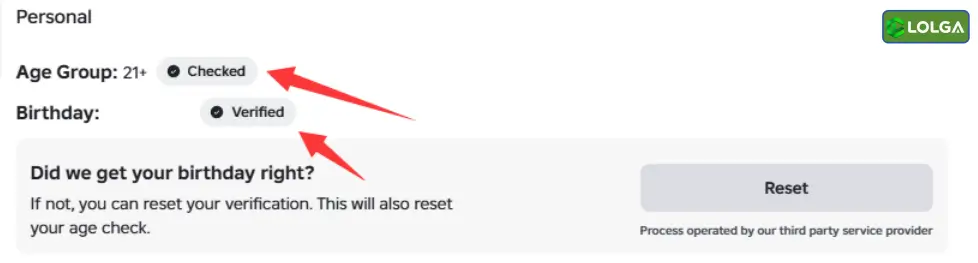
- Make sure Age Group shows Checked and Birthday shows Verified.
- Return to MM2 and try trading the previously restricted weapons again.
Which MM2 Weapons Are Affected by Trading Restrictions?
Some players who have not completed identity verification may find that they cannot trade the following six weapons again after receiving them.
| Regular Version | Chroma Version |
|---|---|
| Emberbow Gun | Chroma Emberbow Gun |
| Emberscythe | Chroma Emberscythe |
| Embersickle | Chroma Embersickle |
If you purchased these weapons to trade with other players, exchange items, or expand your collection, it's a good idea to complete Roblox identity verification beforehand.
Keep in mind that the currently known trading restrictions affect these six weapons. This does not mean that all MM2 weapons require identity verification before they can be traded.
How to Check If Your Roblox Account Needs Identity Verification
Before starting the verification process, open your Roblox Account Info page and check the verification status under the Personal section.
Pay particular attention to two fields: Age Group and Birthday.
| Verification Field | Before Verification | After Verification |
|---|---|---|
| Age Group | May already show Checked | Checked |
| Birthday | Does not show Verified | Verified |
| Continue with ID | Verification option is available | Verification completed |
Even if your Age Group already shows Checked, this does not necessarily mean your birthday has been verified. If Birthday does not show Verified and the Continue with ID button is still available, you need to complete the birthday verification process.
How to Unlock Restricted Items in MM2
To remove these trading restrictions, you need to complete birthday verification through your Roblox account settings. This process does not take place inside MM2.
- Open Roblox Settings.
Log in to your Roblox account, open the menu, and select Settings.
-
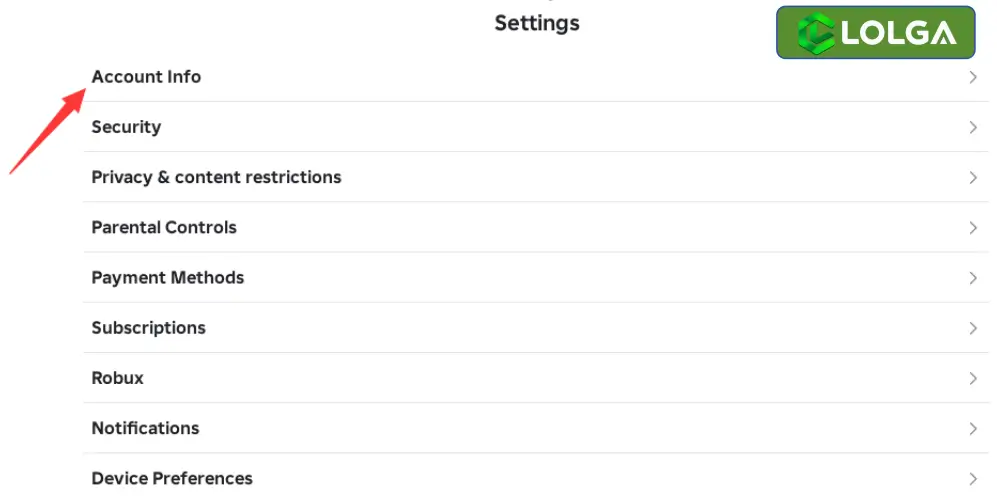
Open the Roblox menu and select Settings. - Go to Account Info.
Select Account Info from the Settings menu to open your account information page.
-
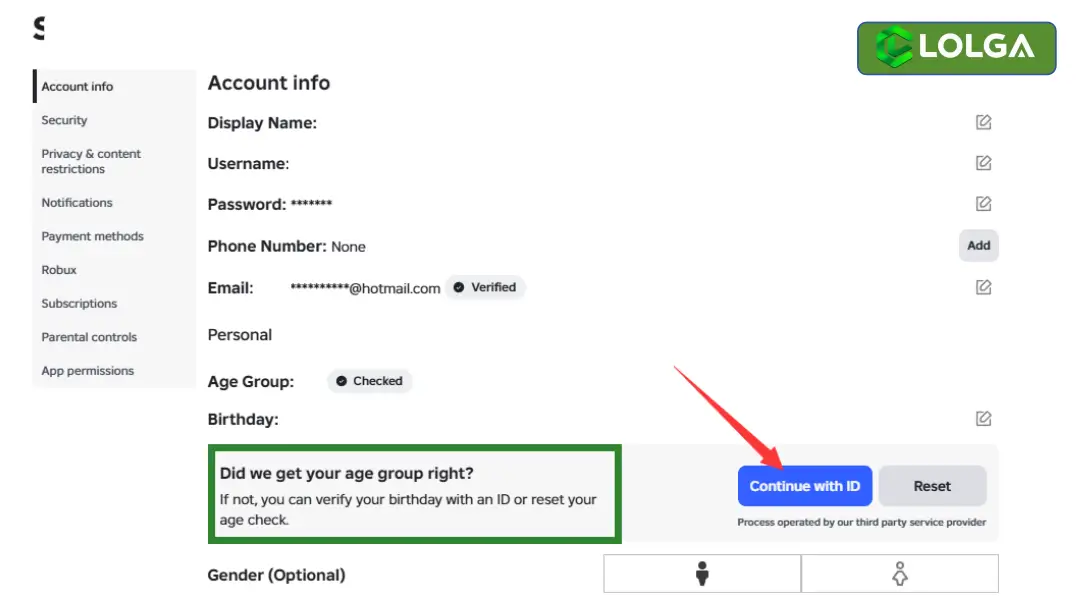
Select Account Info from the Roblox Settings menu. - Click Continue with ID.
Find the Personal section on the Account Info page. Locate the Continue with ID button below Birthday and click it to start the identity verification process.
-
Find Continue with ID below the Birthday field. - Complete Birthday Verification.
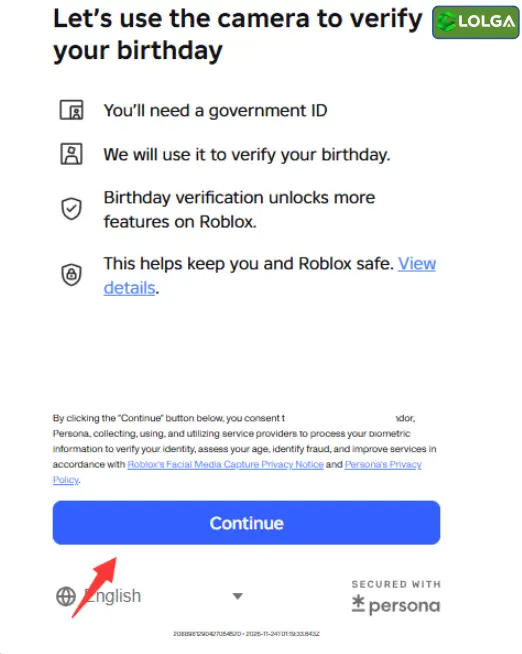
Once you enter the verification page, Roblox will prompt you to use your camera to verify your birthday.
Prepare a government-issued ID, click Continue, and follow the on-screen instructions to complete the process. Roblox uses Persona as its third-party identity verification provider.
Security Tip: Always complete verification through the official Roblox platform. Do not follow unfamiliar verification links sent by other players, and never share your ID documents, account password, or other sensitive personal information with trading partners or third-party sellers.
-
Follow the prompts on the Persona verification page. - Confirm Verification and Return to MM2.
After completing verification, return to your Roblox Account Info page and check the verification status under Personal.
Your verification is complete when Age Group shows Checked and Birthday shows Verified.
You can now return to MM2 and try trading the previously restricted weapons again.
Does Being Unable to Trade Mean Something Is Wrong With Your MM2 Item?
If you have completed Roblox identity verification but still cannot trade your MM2 weapons, the issue may be related to other factors beyond account verification.
| Possible Issue | What You Can Try |
|---|---|
| Your MM2 level is below 10 | Level up until you reach Level 10 |
| You cannot receive trade requests | Check whether Trade Requests are enabled |
| Your Roblox client is outdated | Update to the latest official version |
| You are using an unofficial or modified client | Reinstall the official Roblox client |
| Your account is still affected by a Trade Lock | Check your email and phone number verification status, and contact customer support if necessary |
| The in-game trading system is experiencing an issue | Try rejoining the game, although this may not resolve the problem |
Some players have reported that verifying their email address and phone number helped restore trading for Ember weapons. However, this method is not guaranteed to work for every account.
If you purchased your MM2 weapons from LOLGA and still cannot trade them after trying the steps above, contact LOLGA customer support. Provide your order number, the name of the restricted weapon, and a screenshot of the in-game trading issue so the support team can better understand your situation.
Do not send customer support photos of your ID, your Roblox account password, or other sensitive personal information.
What Should You Check Before Buying MM2 Weapons?
If you plan to buy Emberbow Gun, Emberscythe, Embersickle, or any of their Chroma versions, check your Roblox account's birthday verification status beforehand. This can help you avoid receiving a weapon that you cannot trade again.
If you have already completed verification and are ready to expand your weapon collection, visit the LOLGA MM2 Shop to browse Godly, Chroma, and other MM2 weapons and find items that fit your collection.
Buying MM2 Weapons for Your Child?
If you're choosing MM2 weapons as Christmas gifts for your child, make sure you understand their account's trading permissions and any relevant verification requirements before making a purchase.
Read our MM2 Christmas 2026 Parent Gift Guide to learn how to choose suitable MM2 weapons for your child.
MM2 Trading Restrictions FAQ
Why Can I Receive MM2 Weapons but Cannot Trade Them Again?
Some MM2 weapons have additional requirements for subsequent trades. If your Roblox account has not completed birthday verification, you may be able to receive these weapons but still be unable to trade them again.
Do All MM2 Weapons Require Identity Verification Before Trading?
The currently known trading restrictions affect six weapons: Emberbow Gun, Emberscythe, Embersickle, and their Chroma versions. It has not been confirmed whether other MM2 weapons are subject to the same restrictions.
Why Does My Age Group Show Checked but I Still Cannot Trade?
An Age Group status of Checked does not necessarily mean your birthday has been verified. Check whether Birthday shows Verified. If it does not, click Continue with ID to complete birthday verification.
How Do I Unlock Restricted MM2 Chroma Weapons?
Go to Roblox Settings → Account Info, click Continue with ID, and follow the on-screen instructions to complete birthday verification.
Do I Need to Buy the Weapon Again After Removing the Trading Restriction?
No. If the weapon has already been successfully added to your in-game inventory and the restriction is caused by incomplete account verification, you only need to complete the required verification. You do not need to purchase the same weapon again.
Do I Need to Verify My Identity Inside MM2?
No. The entire identity verification process takes place through your official Roblox account settings.
What Should I Do If I Still Cannot Trade After Birthday Verification?
First, make sure Birthday shows Verified and confirm that you completed verification on the same Roblox account that received the weapon. If the issue persists and you purchased the weapon from LOLGA, contact LOLGA customer support for assistance.