





































The current Anime Dice codes include UPDATE1, UPDATE2, UPDATE3, 1KCCU, 5KCCU, 10KCCU, 20KCCU, UPDATE4, 30KCCU, 40KCCU, and 100KLIKES. Their rewards include Lucky Spins, Trait Rerolls, Gems, and Tickets.
All Working Anime Dice Codes
Use the table below to grab the current Anime Dice codes. Each code has a Copy button so you can paste it directly into the game.
| Code | Reward |
|---|---|
| UPDATE1 | 2× Lucky Spin, 3× Trait Reroll, 3× Gems |
| UPDATE2 | 2× Lucky Spin, 5× Trait Reroll, 5× Gems |
| UPDATE3 | 2× Lucky Spin, 7× Trait Reroll, 7× Gems |
| 1KCCU | 2× Lucky Spin, 5× Trait Reroll, 5× Gems |
| 5KCCU | 2× Lucky Spin, 5× Trait Reroll, 5× Gems |
| 10KCCU | 2× Lucky Spin, 10× Trait Reroll, 10× Gems |
| 20KCCU | 2× Lucky Spin, 10× Trait Reroll, 10× Gems |
| UPDATE4 | 3× Lucky Spin, 10× Trait Reroll, 10× Gems, 10× Tickets |
| 30KCCU | 2× Lucky Spin, 10× Trait Reroll, 10× Gems |
| 40KCCU | 2× Lucky Spin, 10× Trait Reroll, 10× Gems |
| 100KLIKES | 2× Lucky Spin, 10× Trait Reroll, 10× Gems |
How to Redeem Anime Dice Codes
Redeeming Anime Dice codes takes only a few steps. You can access the code box through the Shop menu.
Launch Anime Dice
Start Anime Dice on Roblox and enter the game.
Open the Shop
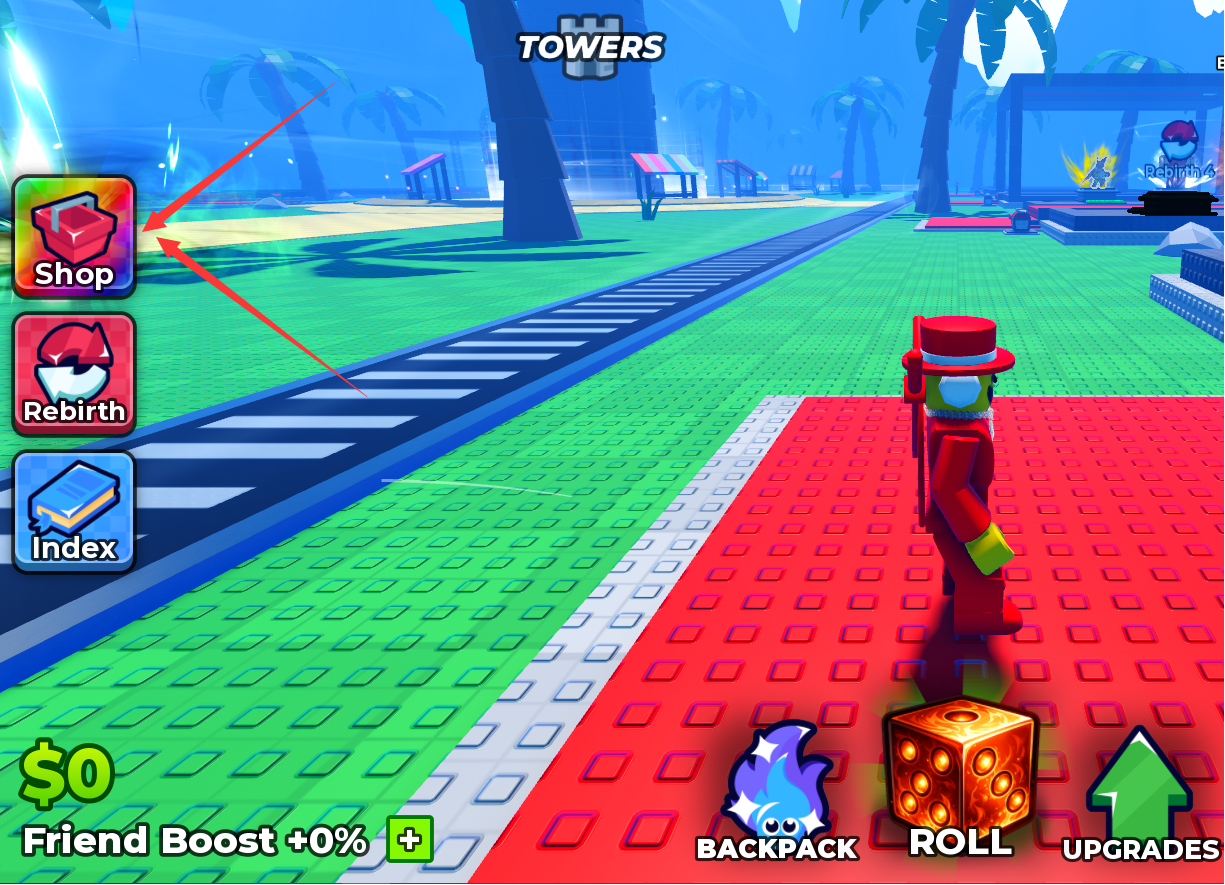
Click the Shop button on the left side of the screen.
Find the Codes Box
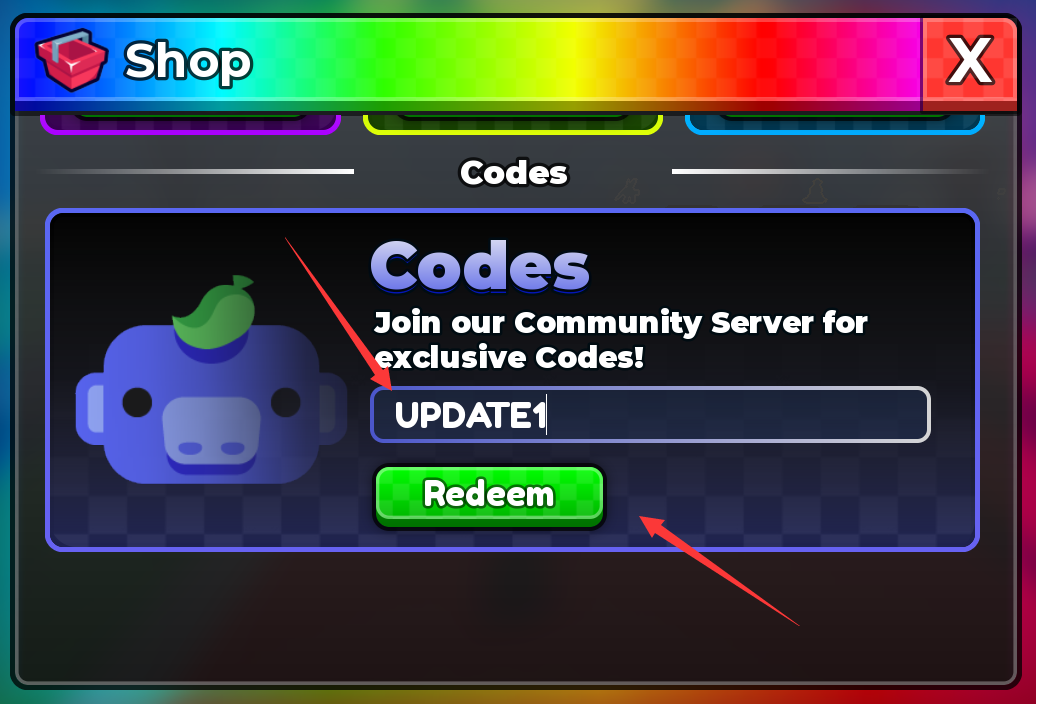
Scroll down inside the Shop menu until you find the Codes text box.
Enter and Redeem the Code
Type or paste an active code into the text box, then click Redeem to claim the reward.
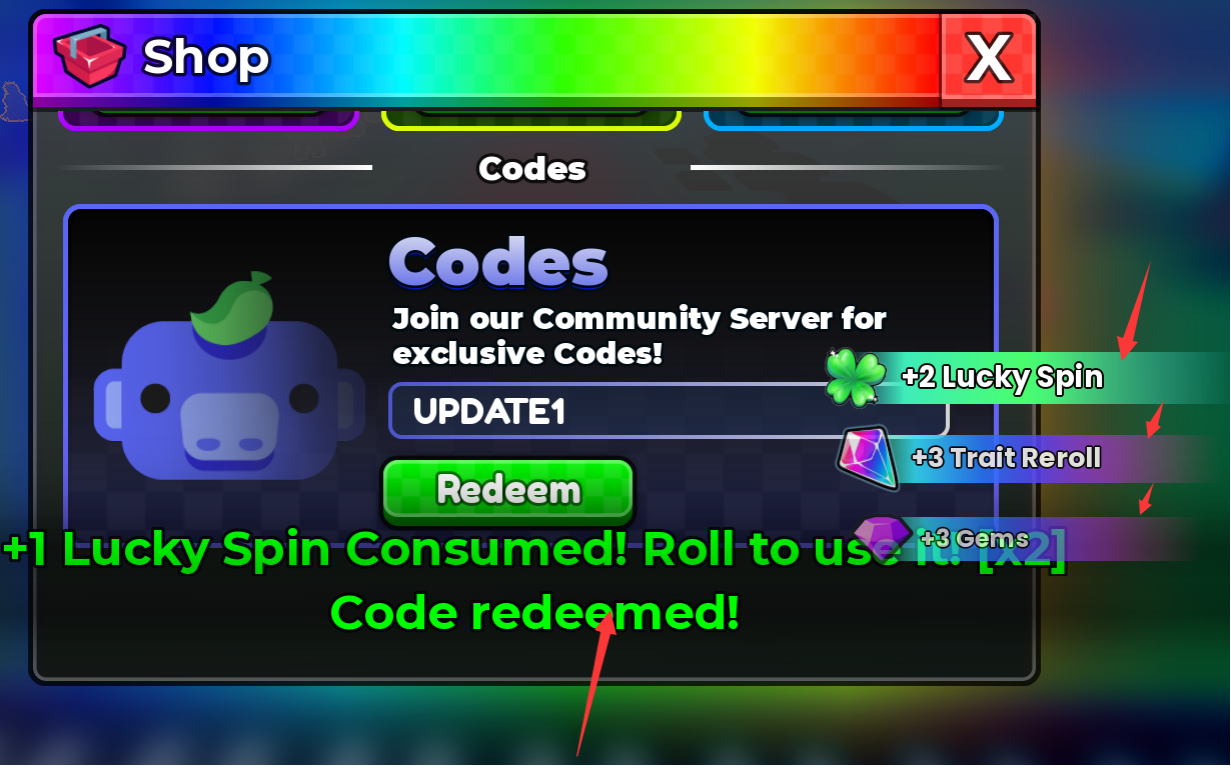
Copying a code directly from the table can help prevent spelling, capitalization, or extra-space mistakes.
Why Your Anime Dice Code May Not Work
If an Anime Dice code does not give you its reward, check these common possibilities:
- The code has expired or has been disabled.
- The code was entered incorrectly. Check every character carefully.
- The code has already been redeemed on your account.
- A newly released code may require you to rejoin the game before it works.
If a code still fails after you copy it exactly, rejoin Anime Dice and try again. A code that remains unavailable may no longer be active.
How to Get More Anime Dice Codes
Anime Dice codes can be tied to updates, player-count milestones, likes, or other community achievements. Milestone codes such as the KCCU rewards and 100KLIKES code show how codes can be connected to different game milestones.
Bookmark this page and check back after major Anime Dice updates or community milestones. That way, new codes can be added to the active list while unavailable ones can be removed.
Final Thoughts
The current Anime Dice code list covers several types of useful rewards, including Lucky Spins, Trait Rerolls, Gems, and Tickets. If you are starting out or saving resources for more rolls, redeeming the available codes gives you extra resources before you spend your own.
Use the Copy buttons above to avoid typing errors, then redeem the codes through the Shop menu in Anime Dice.
Follow LOLGA for fresh Roblox codes, game guides, updates, and useful tips. Check back regularly so you don’t miss newly released rewards.
Follow LOLGAAnime Dice Codes FAQ
What are the current Anime Dice codes?
The current codes are UPDATE1, UPDATE2, UPDATE3, 1KCCU, 5KCCU, 10KCCU, 20KCCU, UPDATE4, 30KCCU, 40KCCU, and 100KLIKES.
What rewards do Anime Dice codes give?
Depending on the code, rewards include Lucky Spins, Trait Rerolls, Gems, and Tickets.
Why is my Anime Dice code not working?
The code may have expired, been disabled, already been redeemed, or entered incorrectly. Check the code carefully and try rejoining the game if necessary.
Related LOLGA Guides