








Buy Custom Orders
- Instant Delivery
- 24/7 Service
- 100% Safety!
Select Games
-
 Steal a Brainrot
-
 Murder Mystery 2
-
 Adopt Me
-
 Grow a Garden
-
 Grow a Garden 2
-
 Rivals
-
 Kick a Lucky Block
-
 Speed Keyboard Escape | Candy & Chocolate
-
 Animal Hospital
-
 Steal An Egg
-
 Escape Tsunami For Brainrots
-
 Be a Lucky Block
-
 Murderers VS Sheriffs
-
 Blox Fruits
-
 99 Nights in the Forest
-
 Anime Dice
-
 Ride A Pet
-
 Slayers 2
-
 Plants vs Brainrots
-
 The Forge
-
 Bee Swarm Simulator
-
 Grand Piece Online
-
 Anime Expeditions
-
 Fish It!
-
 Raise Animals
-
 Universal Tower Defense
-
 Ink Game
-
 HyperShot
-
 Slime RNG
-
 Toilet Tower Defense
-
 Blade Ball
-
 Pets GO
-
 Pet Simulator 99
-
 Anime Defenders
-
 Skibidi Tower Defense
-
 Build A Plane
-
 Prospecting
-
 Survive Lava for Brainrots
-
 Garden Horizons
-
 Bite By Night
-
 The Strongest Battlegrounds
-
 Survive The Killer
-
 NFL Universe Football
-
 Bayside High School
-
 My Restaurant
-
 King Legacy
-
 Custom Orders
-
 Basketball Legends
-
 Driving Empire
-
 Sakura Stand
-
 Pet Catchers
-
 Military Tycoon
-
 Gym League
-
 Dress To Impress
-
 Five Nights TD
-
 Anime Vanguards
-
 Fisch
Fisch
-
 Pet Simulator X
-
 DonutSMP
-
 Anime Reborn
-
 A Dusty Trip
-
 Combat Warriors
-
 Blue Lock: Rivals
-
 Horse Race
-
 Car Dealership Tycoon
-
 Death Ball
-
 Jujutsu Infinite
-
 Murderers VS Sheriffs Duels
-
 Creatures of Sonaria
-
 Anime Adventures
-
 Volleyball Legends
-
 SpongeBob Tower Defense
-
 Sol's RNG
-
 Da Hood
-
 Anime Dimensions Simulator
-
 Basketball:Zero
-
 Arise Crossover
-
 Bubble Gum Simulator Infinity
-
 BlockSpin
-
 Forsaken
-
 Dead Rails
-
 Brookhaven
-
 Climb and Jump Tower
-
 All Star Tower Defense X
-
 Garden Tower Defense
-
 Anime Fighting Simulator: Endless
-
 Break a Lucky Block
-
 Tap Simulator
-
 Chop Your Tree
-
 Murderers VS Sheriffs 2
-
 Abyss
Abyss
-
 Jujutsu Shenanigans
-
 Bizarre Lineage
-
 Knockout
-
 Sailor Piece
-
 Dragon Adventures
-
 BloxStrike
-
 Mini War
-
 Wizard Alchemy
-
 Build A Ring Farm
-
 Universal Tower Defense X
-
 Sniper Arena
-
 Sniper Duels
-
 Catch And Tame
-
 Broken Blade
-
 Racket Rivals
-
 Storage Hunters: Open World
-
 Evomon
-
 Violence District
-
 San Diego Border Roleplay
-
 Tower Defense Simulator
-
 Iron Soul: Dungeon
-
 Survive Zombie Arena
-
 Be The Final Boss
-
 HugoSMP
-
 Murder Duels
-
 Emergency Hamburg
-
 +1 Speed Monkey Escape
-
 Capybaras VS Plants
-
 Dig & Clean
-
 Catch 1 Billion Ducks
-
 Wonderland
-
 Grow a Chicken Fighter
-
 Sharp
Sharp
-
 Slap Battles
-
 Retro Tower Defense
-
 Asylum Life
-
 Ghost Driver
-
 Ninja Legends
-
 OHIO
OHIO
-
 War Tycoon
-
 Muscle Legends
-
 BedWars


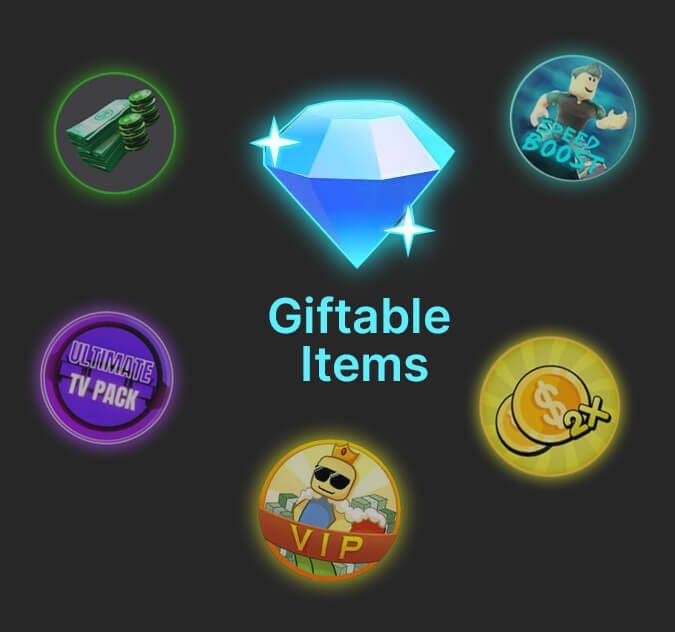
Buy All In-Game Items That Can Be Given as Gifts
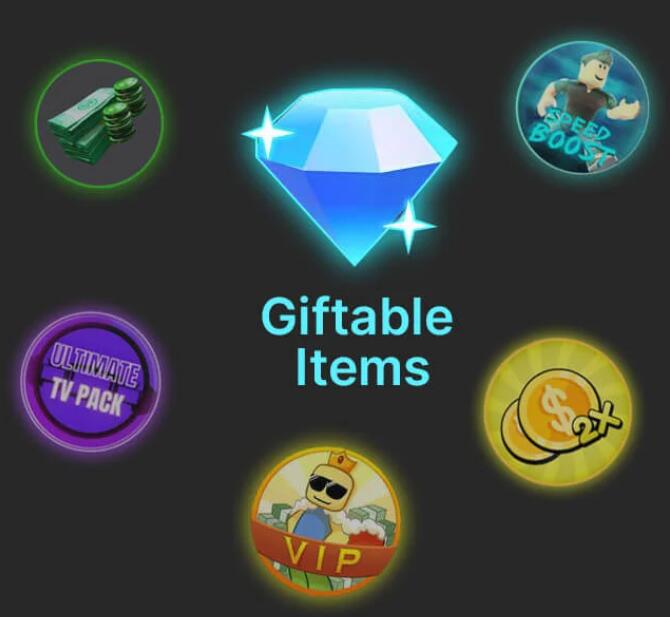
1.In-game items such as Gems, Packs, Spins, Coins, Cash, and Game Passes will have a gift box icon, as shown below.

2. Fill in the quantity of BUX marked for the item in the in-game store on the order and make payment.
3. On the Checkout page, provide the game name, item name, and your BLOX username. Once we receive your order, we will gift you the item in-game according to the details you provide
Min
Max
Customer Order For RBX Items - LOLGA
What Are LOLGA Customer Order?
When you place a customer order for Blox items on LOLGA, you can take advantage of the gifting system available in some Blox games, allowing LOLGA to deliver any in-game items as gifts to you.
Why Do LOLGA Offer Blox Customer Orders?
- There are so many games that we cannot add to our shop; however, you can purchase items that can be given as gifts in some games that we haven't added yet.
- We may not be able to update all the games in our shop daily based on official game updates, but you can use the customer order function to request new update items.
How Can I Place a LOLGA Customer Order?
- Make sure that the Gems, Packs, Coins, Spins, Cases, or Game Passes in the game can be given as gifts. The item should have a Gift Icon.
- Select the Robux price of the item in the game and complete the payment.
- A LOLGA representative will add you as a friend on Blox and gift the item to you in-game.
-

100% Handwork
We supply the game products with 100% handwork and no tricks or scams just a legit and secure shopping experience.
-
Instant Delivery
since we have professional service team, we guarantee that we will finish goods delivery in 15 minutes.
-

Saving Money
100% secure online payment system proved by a million users, you will receive your order at a great price!
-

24/7 Service
We have a professional team providing an outstanding online customer service with friendly and fluent representatives via live chat.
We are not affiliated with, or provide the same services as, Roblox Corporation, Big Games, Adopt Me or Uplift Games
LOLGA.com is an independent player-to-player marketplace for trading virtual game items, unaffiliated with Roblox, Big Games, Adopt Me, Uplift Games, or any developers. All trademarks belong to their owners. We operate independently and are not associated with official game platforms or their intellectual property. Our services are distinct from official company offerings.
Stay in the loop!
Drop your email to get an instant alert when the item returns - and enjoy discounts, deals, and updates from us.